The Smart Audio Hub for Modern Academics: ATEN MicLIVE 6-Channel Podcast AI Audio Mixer (UC8000)
The ATEN MicLIVE 6-Channel Podcast AI Audio Mixer (UC8000) serves as the ultimate all-in-one acoustic command center designed to elevate digital media production, student broadcasting, and campus distance learning workflows. Featuring an intuitive hardware interface backed by an acoustic AI Smart Equalization engine, the MicLIVE completely eliminates the steep technical learning curve that traditionally discourages students and faculty from producing professional-grade audio. From high school communications studios to university lecture spaces, this ultra-compact production hub allows operators to focus entirely on content creation, storytelling, and instructional messaging rather than complex audio engineering barriers.
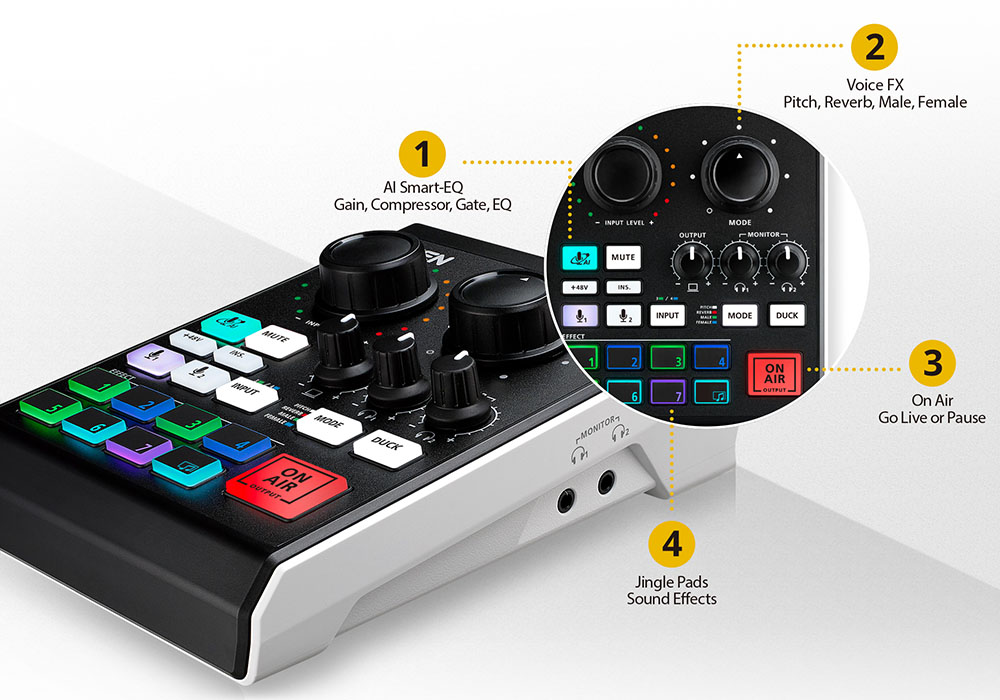


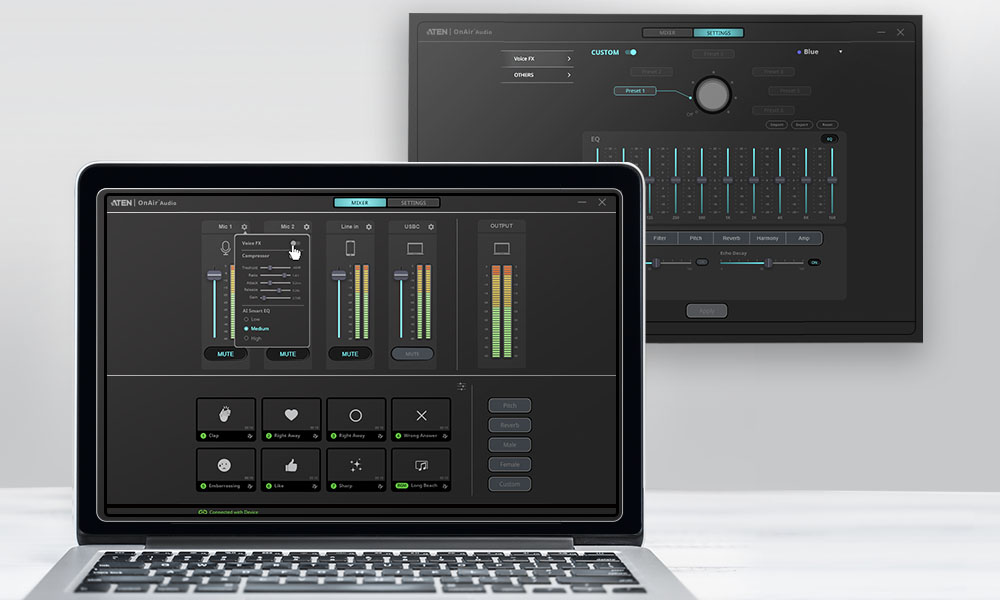
The true institutional power of the MicLIVE UC8000 lies in its automated optimization tools, which are custom-tailored for multi-user school environments. Armed with real-world AI acoustic profiling, the mixer actively tracks vocal frequencies, automatically balancing volume levels, ducking background noise, and applying studio-grade compression the exact millisecond a teacher or student speaks into a microphone. This plug-and-play layout transforms standard classrooms into broadcast-ready podcast spaces, giving multimedia programs, administrative media loops, and campus accessibility tracks the physical speed and engineering stability needed to maintain high-velocity content production with complete technical confidence.
A) Academic Courses, Career Tracks & Student Skills
| Academic Discipline |
Classroom Project & Educational Focus |
Core Student Skill Development |
| Digital Podcasting & Live Streaming |
Students produce official, school-based podcasts, campus news broadcasts, and live event streams, managing multi-guest mic arrays and pre-recorded media drops. |
Digital Storytelling & Production: Teaches collaborative programming, script coordination, remote audio editing, and live mixing fundamentals. |
| Digital Journalism & Broadcasting |
Students record multi-guest interviews, manage panel discussions, and drop intro/outro audio drops using the customized physical sound pads. |
Broadcast Journalism: Builds real-world tracking fluency in live radio layout, timing, pacing, and media production constraints. |
| Speech, Debate & Communications |
Faculty use the mixer to record forensic arguments, capture student oral presentations, and archive team debates for evaluation. |
Vocal Delivery Analysis: Teaches crisp articulation, volume projection control, and auditory pacing metrics. |
| CTE Multimedia Production |
Serves as the foundation for Career and Technical Education (CTE) audio engineering pipelines, covering mixing, levels, and gain structures. |
Studio Signal Processing: Gives hands-on training in microphone gain management, soundboard execution, and mastering. |
Digital Media Software Compatibility Profile
| Software Platform |
Functional Software Interaction Loop |
The Mixed Hardware Advantage |
| Adobe Premiere Pro & Audition |
Passes multi-channel audio directly into digital timelines, matching pre-balanced vocal gain parameters seamlessly to voiceover tracks. |
✓ Cuts Post-Production Time:
The built-in AI handles levels live, completely removing the need to edit muddy waveforms or clips later.
|
| Avid Pro Tools / Audacity |
Serves as a high-fidelity digital audio interface, recording ultra-low latency tracking paths directly onto centralized workspace drives. |
✓ Crisp Master Captures:
Maintains absolute multi-track isolation without software resource overload or dropped signals.
|
| Zoom, Teams & OBS Studio |
Acts as a hardware audio driver for distance learning or morning video announcements, mixing sound effects and mics instantly. |
✓ Auto-Ducking Automation:
Lowers background bumper music automatically when a teacher speaks, keeping class streams clear.
|
Physical Specifications, Functions/Ports & System Requirements
| Specification Category |
Technical Layout Baseline & Connectivity |
Classroom Infrastructure Impact |
| Physical Form Factor |
Dimensions: 130.5 mm x 180.9 mm x 62.7 mm (5.14 in x 7.12 in x 2.47 in). Weight: 0.42 kg (0.93 lbs). Super lightweight composite casing design. |
Maximum Portability: Slips easily into a standard backpack or desk drawer, maximizing flexible space inside shared labs. |
| Input / Output Ports |
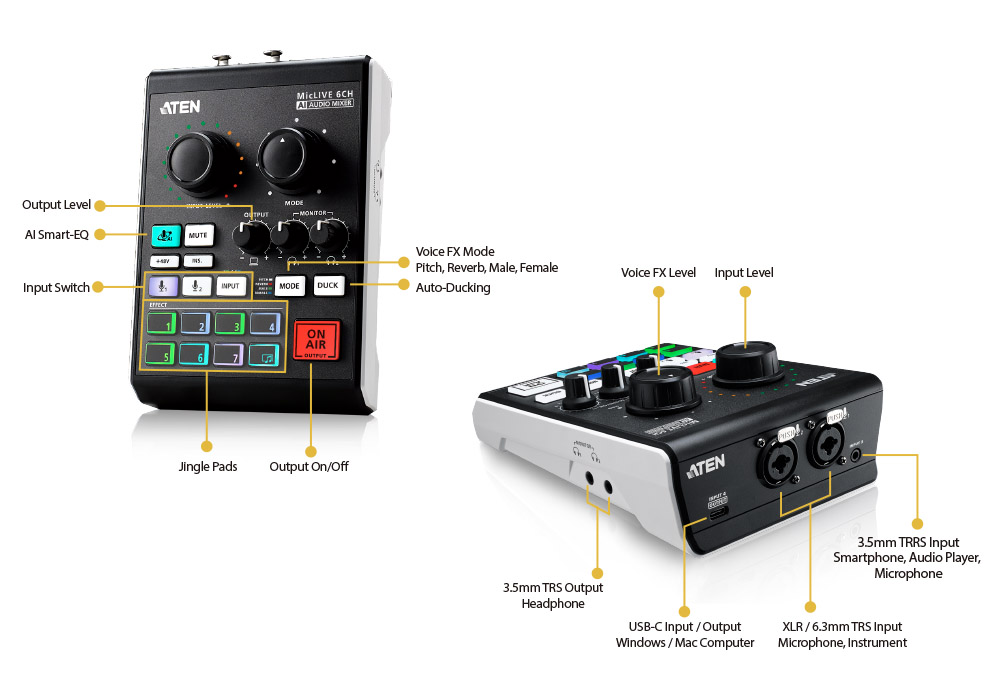
Mics: 2 x Combo XLR / 6.3mm Jacks. Line-In: 1 x 3.5mm TRRS Smart Loop. Outputs: 2 x 3.5mm Headphone Monitor Monitors. Interface: 1 x USB-C Interface. |
Flexible Connections: Allows dual-mic student interviews while running background call-ins straight from an attached smartphone. |
| Integrated Control Array |
2 x Independent Channel Volume Sliders, 8 x Customizable Tactile Sound Effect Jingle Pads, 1 x Master AI Auto-Mix Optimizer Trigger Button. |
Simplified Audio Management: Lets students drop sound effects on the fly without fumbling with complex software menus. |
| Minimum System Requirements |
Windows 10 / 11 (64-bit), macOS 10.13 or newer, Android 9.0+, or iOS 12.1+ devices. Requires 1x available USB Type-A or Type-C tracking port link. |
Cross-Platform Parity: Deploys effortlessly across standard PC labs, MacBook editing carts, or iPad tablets without drivers. |